Seminar 001: Python fundamentals

Welcome to Jupyter!
Jupyter is a coding environment that combines documentation and code which is very suitable for micropublications and to explain code. It is a new fundamental in scientific scripting that aids reproduciblity. Ultimately, Jupyter can help understanding what has been done better than a plain script.
There are two types of cells:
- Code: Here the actual code will be executed
- Markdown: Explanations and any kind of text that helps understanding the code
Each code cell can be executed individually by using the play-button or the key-combo shift + enter. New cells can be added by using the plus-button (+) or the key-combo alt + enter which will execute the current cell and add a new one.
Using Python as a calculator
10.0 * 4 + 100/10
50.0
Variables
- Variables act as "sticky notes" attached to any kind of data or result
- Most essential concept in programming
- Can be accessed later on by using the variables name
- Make sure to name your variable by its content
# Defining a variable
result = 10.0 * 4
# Jupyter specific (needs to be at the end)
result * 10.0
400.0
# Combine variables
parameter = 10.0
result_2 = result * parameter

result_2, parameter
(400.0, 10.0)
# Print statement
print(result_2)
400.0
# Overload the print statement
print(result_2, parameter)
400.0 10.0
# Other operations

# Division (/)
division = 100 / 10
print("Division: ", division)

# Exponents (**)
exponents = 10 ** 2
print("Exponents: ", exponents)

# Modulo (%)
modulo = 10 % 2
print("Modulo: ", modulo)
Division:  10.0
Exponents:  100
Modulo:  0
Data Types
- Numbers: Integers (int) and Floating Point Numbers (float)
- Strings: Collection of multiple characters (str)
Why are data types important?
Data has to be stored in memory to be re-usable and certain "concept" like a number or a word require different memory patterns. For instance, a decimal number is typically stored as a floating point which looks different to an integer data type.
While Python handles all of this for you in the background, understanding data types is still important, as each (dis-)allows a different set of operations.
# Integer
integer = 5

type(integer)
int
# Float
floating_point = 5.0

type(floating_point)
float
# Strings
string = "Hello World"

type(string)
str
# Character indexing (if we assume 1-indexed)
print("Assuming 1 is the first: ", string[1])

# Character indexing (correct 0-indexed)
print("Assuming 0 is the first: ", string[0])

# Character indexing at second position (correct 0-indexed)
print("Assuming 1 is the second: ", string[1])
Assuming 1 is the first:  e
Assuming 0 is the first:  H
Assuming 1 is the second:  e
# Sub-string indexing
sub_string = string[0:5] # Last position is NOT included
print("Extracting the hello: ", sub_string)
Extracting the hello: Hello
# String formatting
var_a = "Hello"
var_b = "World!"

# Using string addition
print("This is a string and it is: " + var_a + " " + var_b)

# Using string formatting
print(f"This is a string and it is: {var_a} {var_b}")
This is a string and it is: Hello World!
This is a string and it is: Hello World!
# Casting of data types (string to int)
int("10"), type(int("10"))
(10, int)
# Impossible casts
int("ten")
---------------------------------------------------------------------------
ValueError                                Traceback (most recent call last)
/tmp/ipykernel_10146/3347839700.py in <cell line: 0>()
      1 # Impossible casts
----> 2 int("ten")

ValueError: invalid literal for int() with base 10: 'ten'
Lists
- Contains a sequence of arbitrary data types
- Started with
[followd by comma-separated entries and closed by] - Individual entries can be accessed using
intindicies (my_list[0]for the first entry) - Order is important
# You were in the lab and recorded a measurement
time1 = 0.0
time2 = 2.0
time3 = 5.0
# Lists are arrays of things
measurement = [0.0, 2.0, 5.0]
measurement
[0.0, 2.0, 5.0]
# Accessing single parts
print("First point: ", measurement[0])
print("Second point: ", measurement[1])
print("Last point: ", measurement[-1])
First point:  0.0
Second point:  2.0
Last point:  5.0
# Accessing a subset
print("First two points: ", measurement[0:2])
First two points: [0.0, 2.0]
# Adding things to lists
measurement.append(20.0)
measurement
[0.0, 2.0, 5.0, 20.0]
# Accessing the last one after appending
measurement[-1]
20.0
# Clear this list
measurement.clear()
measurement
[]
# Sorting
unordered = [0.0, 10.0, 2.0]
unordered.sort()

unordered
[0.0, 2.0, 10.0]
# We can add whatever we want
# It is not type specific!
mixed = [0.0, "Hello", 2.0, print]
mixed
[0.0,
 'Hello',
 2.0,
 <function print(*args, sep=' ', end='\n', file=None, flush=False)>]
# Extract the last element of a list
mixed[-1]
<function print(*args, sep=' ', end='\n', file=None, flush=False)>
# Getting the length of a list
print("Mixed is of length", len(mixed))

# You can also get the length of string!
print("Hello is of length", len("Hello"))
Mixed is of length 4
Hello is of length 5
# How to reshuffle a list (optional)
import random # <-- This is how you import a package

# The random package provides function to perfrom
# randomized operations, such as shuffling
random.shuffle(mixed)

# The list should now be shuffled
mixed
[2.0,
 0.0,
 'Hello',
 <function print(*args, sep=' ', end='\n', file=None, flush=False)>]
Dictionaries
- Mapping from a
keyto avalue - Can be regarded as a collection of "sticky notes"
- Behaves similar to a list, but that the indices are generalized to custom indices
- Order is not important
# How to define a dict
dictionary = {
    "street": "Hölderlinstr", # Key: Value
    "zip": 70193              # Key: Value
}

# We can also do the same with a list, but we
# lose the key that helps us to contextualize it
equivalent = [
    "Hölderlinstr.",          # 0: Value
    70193                     # 1: Value
]

(dictionary, equivalent)
({'street': 'Hölderlinstr', 'zip': 70193}, ['Hölderlinstr.', 70193])
# Access data of a dictionary
dictionary["street"], dictionary["zip"], equivalent[0]
('Hölderlinstr', 70193, 'Hölderlinstr.')
# Inspect the keys of a dictionary
dictionary.keys()
dict_keys(['street', 'zip'])
# Inspect the values of a dictionary
dictionary.values()
dict_values(['Hölderlinstr', 70569])
# Get a list of tuples of a dictionary
dictionary.items()
dict_items([('street', 'Hölderlinstr'), ('zip', 70569)])
# Overriding keys (keys need to be unique!)
dictionary["zip"] = 70569
dictionary
{'street': 'Hölderlinstr', 'zip': 70569}
# Extending a dictionary
dictionary["city"] = "Stuttgart"
# Remove an element (case: Deleting)
del dictionary["city"]
dictionary
{'street': 'Hölderlinstr', 'zip': 70569}
# Two dictionaries!
dictionary_1 = {"Hello": "World!"}
dictionary_2 = {"Hello": "Earth!"}

dictionary_1["Hello"], dictionary_2["Hello"]
('World!', 'Earth!')
# List of dicts
list_of_dicts = [
    {"Hello": "World!"},
    {"Hello": "Earth!"},
]

list_of_dicts[1]["Hello"]
'Earth!'
# Variable -> Dict
address = {"Street": "Hölderlinstr."}
For-loops
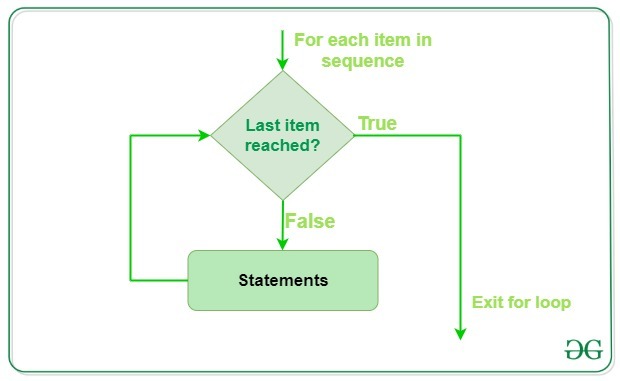
- Used to dynamically iterate over each entry in a list or dictionary
- Helps solving the problem of individual accessing a list
- Most used loop in Python and staright forward
Procedure
- The for-loop "pulls" an entry per round from the list
- Stored in the "variable scope" to the name you've choosen e.g.
variable - Inside the "body" operations can be executed as usual
Example
for variable in my_list:
    # do something
    print(variable * 2)
# Access values in a list
measurement = [0.0, 2.0, 5.0, 20.0]  # Has four elements 0-5

measurement[0] * 10
measurement[1] * 10
measurement[3] * 10
measurement[6] * 10  # Invalid one
---------------------------------------------------------------------------
IndexError                                Traceback (most recent call last)
/tmp/ipykernel_2645/3410863228.py in <cell line: 0>()
      5 measurement[1] * 10
      6 measurement[3] * 10
----> 7 measurement[6] * 10  # Invalid one

IndexError: list index out of range
# Use a for-loop!
for value in measurement:
  print(value)

# value = measurement[0]
# value = measurement[1]
# ...
0.0
2.0
5.0
20.0
# How to not use a for-loop
for value in measurement:
print(value)
  File "/tmp/ipykernel_2645/1267896094.py", line 3
    print(value)
    ^
IndentationError: expected an indented block after 'for' statement on line 2
# Variable scope
value_1 = "I am a string!!!"
for value in measurement:
    print(value_1)

print(value)
I am a string!!!
I am a string!!!
I am a string!!!
I am a string!!!
20.0
# Using variables from outside of the loop
factor = 5.0

for value in measurement:
  print(factor * value)
0.0
10.0
25.0
100.0
# Danger: Naming variables in loops
for value in measurement:
  pass
# Breaking a loop
for value in measurement:
  print(value)
  break
0.0
# Populating lists through loops
# First way: Init then populate

data = []

for value in measurement:
  result = value * 10
  data.append(result)

print(data)
[0.0, 20.0, 50.0, 200.0]
# Second way: List comprehension
data = [value * 10 for value in measurement]
print(data)

# Big NoNo! Nesting list comprehension
factors = [1.0, 2.0]
data = [value * factor for value in measurement for factor in factors]
print(data)

# IF you want to nest
data = []

for value in measurement:
  for factor in factors:
    data.append(value * factor)

print(data)
[0.0, 20.0, 50.0, 200.0]
[0.0, 0.0, 2.0, 4.0, 5.0, 10.0, 20.0, 40.0]
[0.0, 0.0, 2.0, 4.0, 5.0, 10.0, 20.0, 40.0]
While-loops
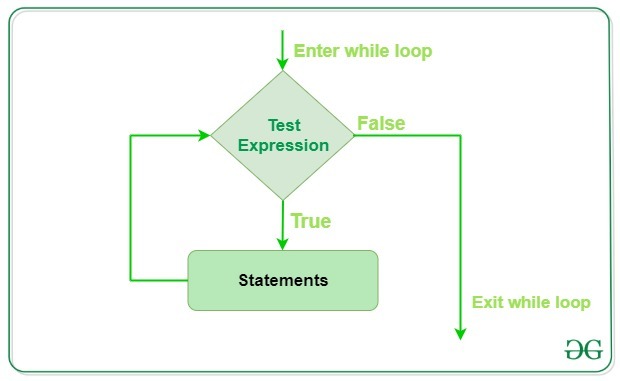
- Behaves similar to the for-loop
- Stops whenever a specific condition is met, such as when a number is greater some value
- Does not pull entries from a list, thus it needs to be done manually
- Needs a starting condition that is evaluated at each round
- Can end up in an infinite loop
- Rarely used and should only be considered when dealing with highly dynamic tasks
Procedure
- Set up a starting condition and a termination condition
- Enter the body of the loop and perform the operation
- At the next iteration, the condition is tested
- If met, the loop continues. If not, the loop is terminated
Example
index = 0

while index <= 10:
    print(index)

    # Index needs to be increased manually
    index += 1
# Basics of a while-loop
index = 0

while index < len(measurement):
    value = measurement[index]
    print(f"Index: {index} | Value: {value}")

    # Longer form
    # index = index + 1

    # Shorten it
    index += 1
Index: 0 | Value: 0.0
Index: 1 | Value: 2.0
Index: 2 | Value: 5.0
Index: 3 | Value: 20.0
# Be aware of infinite loops!
while index < len(measurement):
  value = measurement[index]
  print(f"Index: {index} | Value: {value}")
Conditions
- If-else statements are very important to deal with certain situations
- Whenever a condition is met, the following code is executed
- Optionally, an
elsestatement can be used to deal with all situations that did not match the condition
Using conditions wisely
- Try to use as less as possible and as much as needed
- Nesting too many
ifs is a sign of bad design - Sometimes it is helpful to deal with what you dont want (see Guard clauses)
# If-statement basics
list_of_values = [10.0, -2.0, 20.0]
positive_values = []

for value in list_of_values:
  if value > 0:
    positive_values.append(value)

print(positive_values)
[10.0, 20.0]
# If-else-statement basics
list_of_values = [10.0, -2.0, 20.0, 0.0]
positive_values = []
negative_values = []

for value in list_of_values:
  if value > 0:
    positive_values.append(value)
  elif value == 0.0:
    print("We found the zero!")
  else:
    negative_values.append(value)

print(positive_values), print(negative_values)
We found the zero!
[10.0, 20.0]
[-2.0]
(None, None)
# String comparisons
bag_of_words = ["Hello", "World", "Whats up!", "world"]

for word in bag_of_words:
  if word == "Hello":
    print("We found hello!")
We found hello!
# Numerical conditions
for value in list_of_values:
  if value > 0:
    print("We found a positive value!")
  elif value < 0:
    print("We found a negative value!")
  elif value == -2.0:
    print("We found the 2.0!")
We found a positive value!
We found a negative value!
We found a positive value!
Its all about the sauce
Navigating through the syntax jungle can be quite tempting and exhausting. However, most problems you will be confronted with have already been solved numerous times. Thus, knowing your sources is the utmost important skill when programming. There are multiple sites where problems are discussed and solutions are given!
Helpful sites
- StackOverflow - Probably the best site to search for help
- W3Schools Python - Great overview of Pythons functionality
- PythonCheatSheet - Another great overview
- Google - The most used tool in Software Development